Built Canada's immigration score calculator.
For millions of immigrants, one score changes everything. The official tool gives you a number. I built one that turns that number into action. Researched, designed, and shipped solo in 3 days.
The Comprehensive Ranking System (CRS) is Canada's Express Entry scoring framework used to rank permanent residency candidates out of 1,200 points. The official IRCC calculator is technically correct, but creates enormous friction. People spend hours on something that should take minutes, walking away without understanding why their score was what it was, or knowing what to do about it.
A single-page, zero-scroll calculator that shows not just your score, but what drives it and how to improve it. Built with complete transparency across all four CRS pillars, PDF upload for language scores, and a target score advisor that turns a number into a plan. Designed, built, tested, and deployed by one person in 3 days using vibe coding — an AI-augmented approach to end-to-end product development.
Finding the real pain, not just the obvious one
Before designing anything, I spoke with 18 Express Entry candidates across different stages of their immigration journey — some already in Canada, others applying from abroad. I also conducted a thorough heuristic analysis of the existing IRCC calculator.
Five critical pain points emerged consistently:
What the research uncovered
Across 18 interviews, the same frustrations surfaced repeatedly. I grouped them into five core themes — each representing a distinct failure in the current experience.
I spent an entire Saturday trying to understand my score. I still don't know if I should wait or retake my IELTS.
A consultant would charge $100/hr to explain this to me. I just want the app to show me where I'm losing points.
After conducting qualitative interviews, I used Claude to synthesise raw notes into themed clusters, identify the highest-frequency pain points, and generate structured insight summaries. What would have taken a full synthesis workshop was compressed into a focused 2-hour session. AI analysed patterns across all 18 conversations simultaneously, flagging recurring language and emotional signals I might have missed.
Mapping what we can fix and what we cannot
Not all CRS attributes are equal from the user's perspective. Some — like age, marital status, and spouse's education — are fixed. Others — like language scores, work experience, and additional qualifications — are within the user's control. Surfacing this distinction became a core design principle.
I built a CRS attribute control matrix to map every input against the user's degree of control and its point impact. Attributes with high user control and high point value (like language scores at 136 points, or Canadian work experience at 80 points) were designed to feature prominently. Fixed attributes like age (110 points, zero control) were deprioritised in the UI.
The language score translation problem required a dedicated solution. Users were manually looking up conversion tables to translate raw TEF/IELTS/CELPIP scores into CLB levels — a process we automated entirely through PDF upload and automatic extraction.
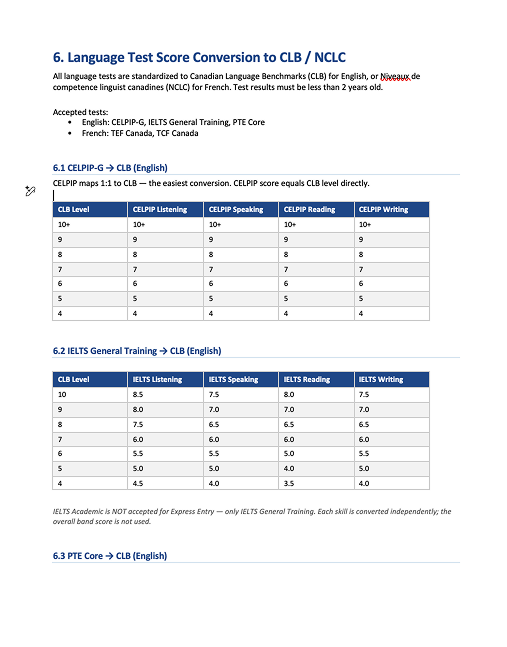
I prompted Claude with the full IRCC scoring documentation and asked it to build a comprehensive PRD covering all formulas, accepted language tests, CLB conversion tables, scoring logic for all four pillars, and known edge cases. The PRD that would have taken days to compile was produced in under an hour — becoming the single source of truth for both design and development.
Four wireframes, one principle: everything above the fold
The design direction was clear: no scrolling, all critical information visible simultaneously, real-time score updates without a "calculate" button, and visual indicators for every category — not just a total.
I wireframed four focused screens, each solving a distinct problem from the research phase.
Rather than jumping straight to Figma for every iteration, I used Claude Code to rapidly prototype layout ideas directly in code — specifying constraints like "keep all critical details above the fold" and "no scroll required." This let me evaluate spatial decisions at interactive speed. Once the layout logic was settled, I moved final designs into Figma for polish.
Vibe coding — a new way to build
This project introduced me to a new development paradigm I call vibe coding — using Claude Code as an intelligent build partner rather than just an autocomplete assistant. I didn't write code from scratch. I described intent, reviewed output, iterated on logic, and made creative and architectural decisions. The AI handled translation into working code.
What would traditionally require a frontend developer, a backend developer, and several weeks was compressed into 3 days of focused, AI-augmented work.
PRD Creation with Claude
I gave Claude the IRCC website and asked it to document the complete CRS scoring logic: all formulas, all accepted language tests with CLB conversion tables, all four pillars, and known edge cases. This step alone would have taken 2–3 days manually. It took 45 minutes.
Execution Plan from Claude Code
With the PRD as input, Claude Code proposed a technical plan: component structure, data models for each CRS pillar, scoring logic architecture, and the PDF parsing approach. I reviewed and directed this plan, making product decisions about scope and priorities.
Iterative Layout Building
I prompted Claude Code with my design principles: everything above the fold, real-time score updates, visual indicators per category. I iterated through multiple rounds, directing changes in plain language: 'move the score summary to the right panel,' 'collapse the spouse section when marital status is single.'
PDF Upload & Score Parsing
The most technically challenging feature. I experimented with multiple PDF parsing libraries through Claude Code until extraction was accurate across TEF Canada, IELTS, and CELPIP result formats. Raw scores are automatically mapped to CLB levels. This feature alone saves users ~15 minutes.
Score Card & Target Advisor
The Target Score Advisor lets users set a desired score and surfaces the top improvement strategies ranked by point impact: retaking language tests, gaining Canadian work experience, pursuing a PNP. This required careful logic to calculate score deltas across every combination of attribute changes.
Job Offer Points Correction
During testing I identified a scoring discrepancy. The initial implementation included job offer bonus points that IRCC removed as of March 25, 2025. This was caught, documented, and corrected — a reminder that even AI-assisted builds require rigorous domain expertise in the review loop.
I used Claude Code for every stage of development: component architecture, scoring logic implementation, PDF parsing library selection and integration, CSS layout iterations, and debugging. My role was product owner and director. I specified requirements, reviewed outputs against the PRD and design intent, identified failures, and re-prompted with corrections. This is vibe coding — AI does the syntax, the human does the thinking.
The plugin that proved the calculator was right
Once the app was functional, I needed to validate scoring accuracy at scale. Testing manually — filling the local app, noting the score, re-entering everything on the IRCC site, comparing — takes about ~40 minutes per profile. I built a Chrome extension that does the same thing in under 30 seconds.
The extension generates randomised candidate profiles, auto-injects them into both the local calculator and the official IRCC tool, compares the scores, and logs any discrepancies with the exact profile that caused them.
The Chrome extension itself was built using Claude Code. I described the testing workflow: generate, inject, compare, log. Claude Code built the extension from scratch including the DOM injection scripts for both the local app and the IRCC site. Deployment issues encountered on Vercel were also debugged and resolved through Claude Code.
Measurable change across every problem area
After launch, the redesigned calculator was used by real Express Entry candidates. Every pain point identified in research showed measurable improvement.
The visual guidance helps me understand what attributes or skills I lack and where I need to improve. I've never been able to see this so clearly.
Simplicity and accuracy. That's it. This is what the official site should look like.
This project demonstrates AI-augmented end-to-end delivery. AI was not a shortcut — it was a multiplier. Research synthesis, PRD generation, layout prototyping, scoring logic implementation, PDF parsing, QA automation, deployment debugging: every phase involved AI as an active collaborator. My contribution was domain expertise, design judgment, product thinking, and architectural direction. The result: a complete, accurate, deployed product in 3 days, built by one person wearing five hats simultaneously.