← Back to Projects
Energy / Industrial IoT

Redesigning the Digital Backbone of Substation Maintenance

How remote user research and domain expert collaboration uncovered the mental model behind a critical power infrastructure platform

Role
Senior UX Designer
Duration
8 months
Tools
Figma + NEXT Design System
Scope
4 modules
Redesigning the Digital Backbone of Substation Maintenance

Challenge

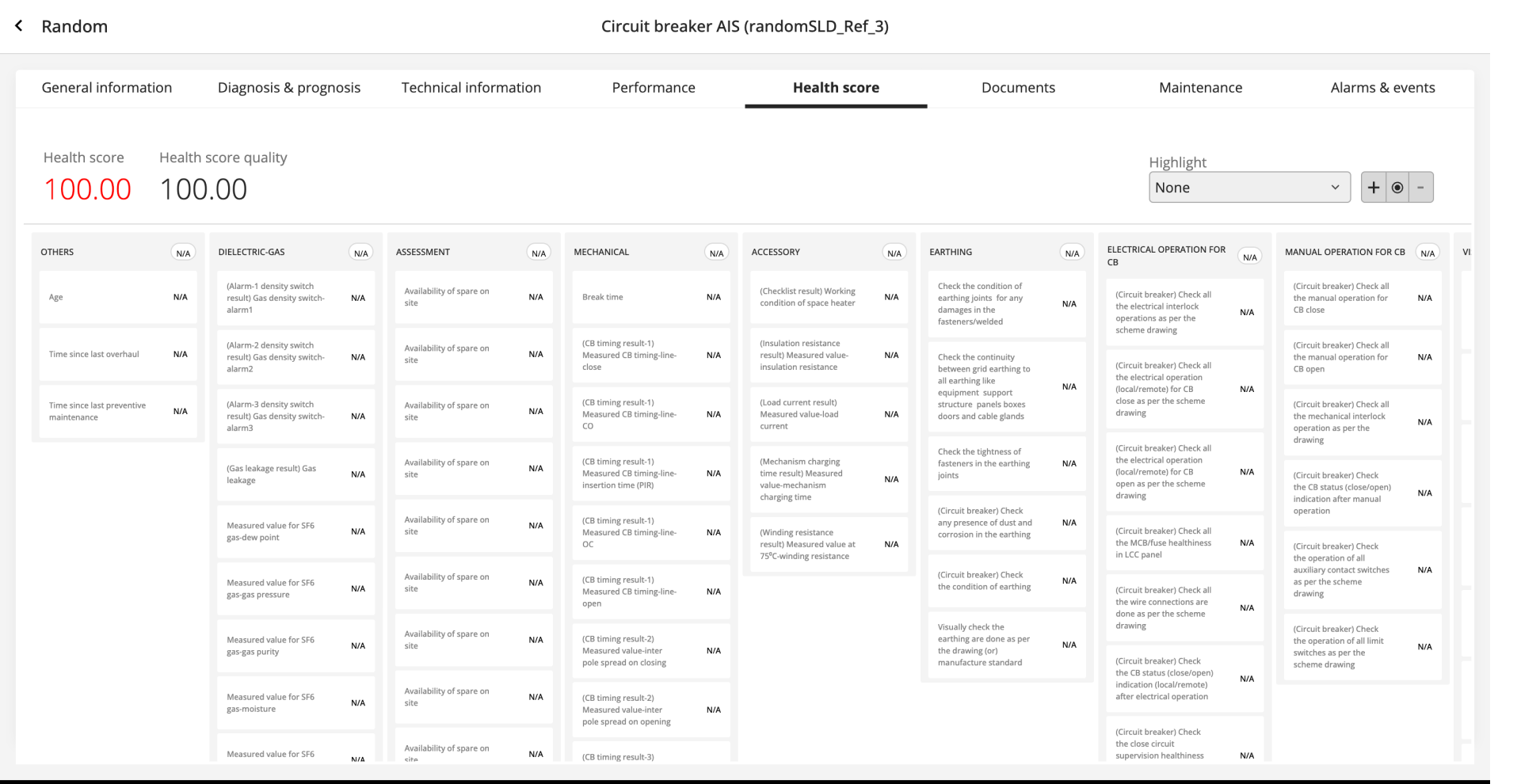
RelCare is Hitachi Energy's digital platform for managing the maintenance of power substation assets like transformers, circuit breakers, and protective relays. The existing interface presented dense engineering data in flat, scrollable card layouts with no hierarchy. Field engineers and maintenance managers struggled to quickly identify which assets needed attention, buried under screens of raw characteristics and N/A values.

Solution

Through remote user interviews and deep domain expert collaboration, we uncovered the hierarchical mental model engineers actually use — a breakthrough captured in a single whiteboard sketch by a 20-year veteran. This insight transformed the entire design direction, replacing flat data grids with a drill-down architecture across four core modules, from health monitoring through field maintenance execution, all built within a design system being developed in parallel.

50+
Characteristics per asset that engineers needed to scan across subsystems
4
Core modules redesigned: Health Score, SLD Editor, Maintenance, Reporting
12+
Remote interviews and live field walkthroughs with engineers and maintenance teams
20+
Years of domain expertise our closest research collaborators brought to the table
01 · Context

A platform that keeps the lights on

RelCare is Hitachi Energy's digital platform for managing power substation maintenance — transformers, circuit breakers, protective relays. The kind of infrastructure where a missed warning can black out a city.

The platform covers four steps: risk monitoring, maintenance engineering, maintenance planning, and maintenance execution. Users are field engineers and asset managers working under time pressure across remote installations, who need the right information surfaced fast.
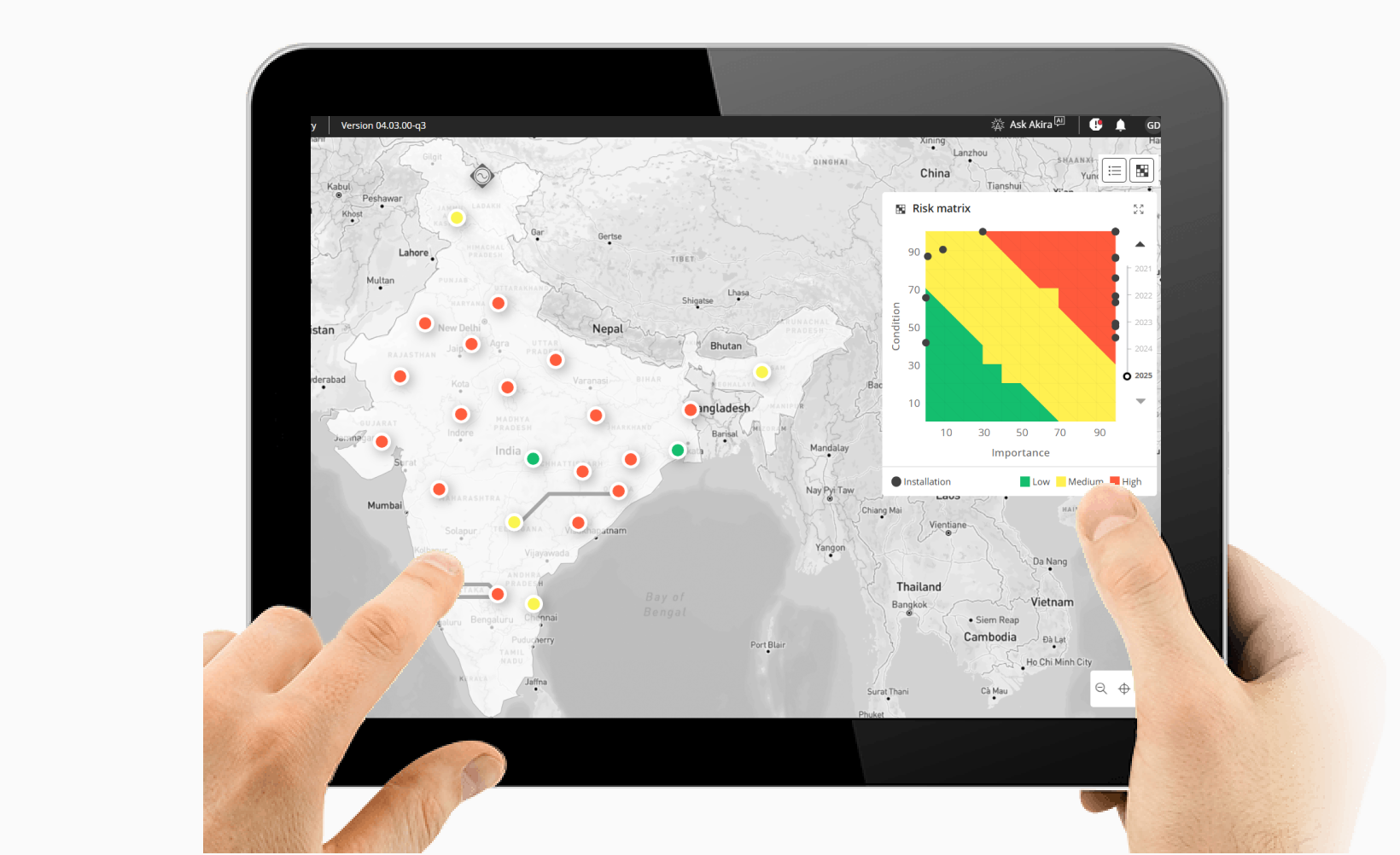
RelCare platform displayed on a tablet showing the map view with risk matrix overlay for substation installations
02 · Research

Understanding engineers from a distance

Users are spread across remote substations in different geographies. We combined two research approaches: remote interviews with engineers, maintenance managers, and field leads, and live camera walkthroughs where engineers shared their screens and cameras as they walked through actual substation evaluations on-site.

Watching an engineer physically move between assets, reference paper checklists, and narrate their decision process in real time surfaced insights that meeting-room interviews alone never would. We supplemented these with domain expert sessions — engineers with 20+ years of field experience.

You can't just show someone a list of numbers and expect them to understand what's happening inside a transformer. They need to see the story the data is telling — which subsystem is degrading, how fast, and what it means for the next maintenance window.
Domain Expert, Substation Engineering (20+ years)
Persona of a substation maintenance engineer showing responsibilities, motivations, pain points, and device usage

Key findings

Five problems surfaced consistently — each a gap between how the interface presented data and how engineers actually think.

Flat data vs. hierarchical thinking
Engineers think in hierarchies — asset → subsystem → characteristic. The interface showed everything at the same level, forcing users to mentally reconstruct the structure.
N/A noise overwhelming real signals
Most characteristics showed "N/A" for any given asset type. Engineers had to visually filter dozens of irrelevant values to find the 6-8 that actually mattered.
No subsystem-level summary
There was no way to see "the mechanical subsystem is degrading" at a glance. Users had to scan every individual characteristic and synthesize the pattern themselves.
Horizontal scroll hiding critical data
Subsystem cards extended off-screen to the right. Engineers couldn't see all subsystems simultaneously, breaking their ability to compare and prioritize.
No risk context on the SLD
The Single Line Diagram showed electrical topology but no condition data. Engineers had to mentally cross-reference two separate views to assess spatial risk patterns.

From requirements to task flows

We translated dense functional requirement documents into user-centered task flows — restructuring technical specifications around what engineers actually need to do.
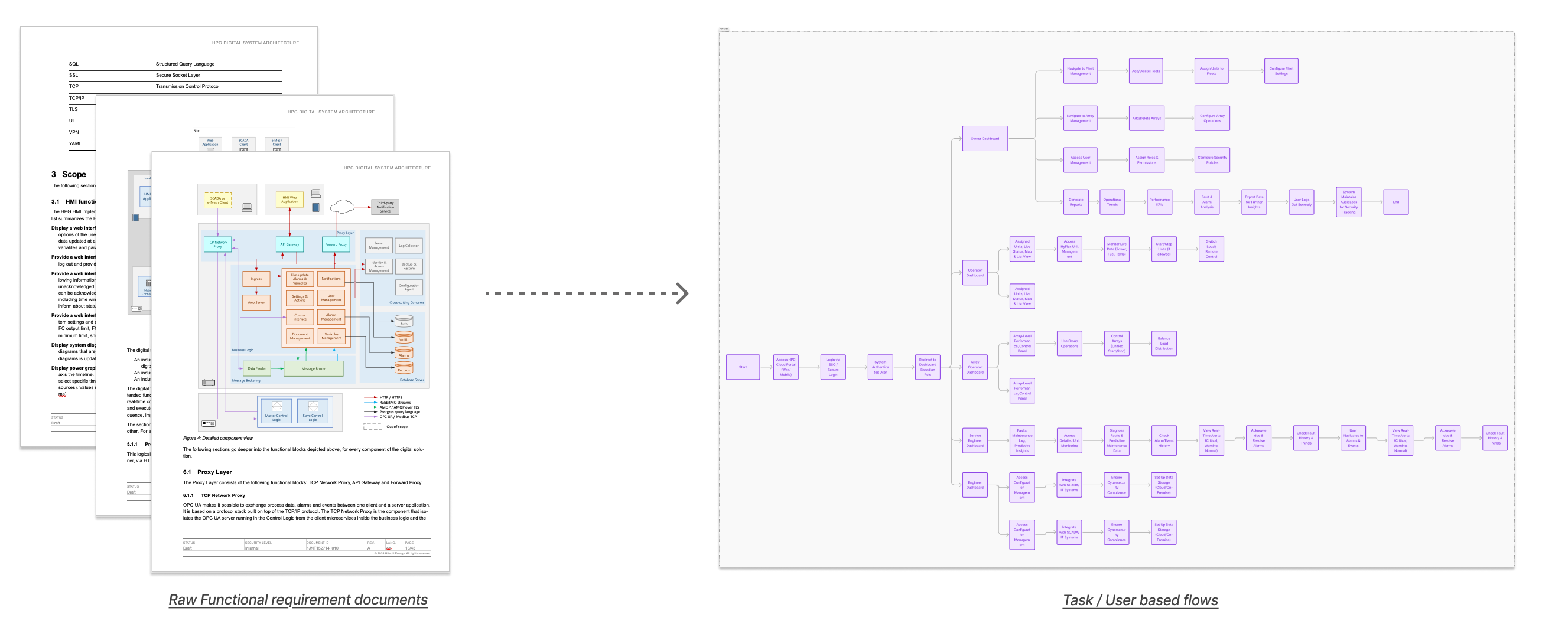
Side-by-side comparison showing raw functional requirement documents on the left transformed into user-centered task flows on the right
03 · Turning Point

The sketch that changed the direction

During a working session, a senior substation engineer sketched a tree on the whiteboard: transformer at the top, six subsystems branching below, individual characteristics under each. "I don't look at 50 numbers. I look at six subsystems. If one is red, I go deeper."

That sketch became the information architecture for the entire redesign.

The existing Health Score interface showing a flat horizontal layout of cards grouped by subsystem, all displaying N/A values with no visual hierarchy
I don't look at 50 numbers. I look at six subsystems. If one is red, I go deeper into it. If they're all green, I move on to the next asset. That's how every experienced engineer works.
Senior Substation Engineer, Domain Expert Session
Hierarchical mental model diagram: Transformer at the top branching into six subsystems (Dielectric Gas, Mechanical, Earthing, Electrical Operations, Assessment, Accessories), each branching into individual characteristics
04 · Design Exploration

From mental model to interface

The challenge: preserve the simplicity of "six subsystems, drill deeper when needed" while handling 50+ characteristics per asset.

01

Layout restructuring

Establishing the core information hierarchy. Top section for overall health score with gauge, trend chart, and recommendation count. Bottom section for subsystem breakdown with drill-down capability. This was the first wireframe that reflected the expert's tree structure.

02

Tree view exploration

Testing a tree-based navigation pattern for the subsystem hierarchy. Left panel shows expandable subsystem nodes with health scores. Right panel shows characteristic details for the selected subsystem. This directly mirrors the mental model from the whiteboard sketch.

03

Data density refinement

Refining the tree view with real data to test density limits. Adding sparkline trends, quality indicators, and recommendation badges to each characteristic row. Ensuring the layout handles assets with 50+ characteristics without visual overload.

04

SLD risk overlay concept

Early exploration of overlaying condition data directly onto the Single Line Diagram. Mapping the risk matrix (condition vs. importance) onto each asset node in the schematic, using a green-yellow-red color scale to show where risk concentrates spatially.

05 · Design Details

The solutions, in detail

Four modules, each requiring a different kind of design thinking.

Health Score: Summary panels + subsystem drill-down

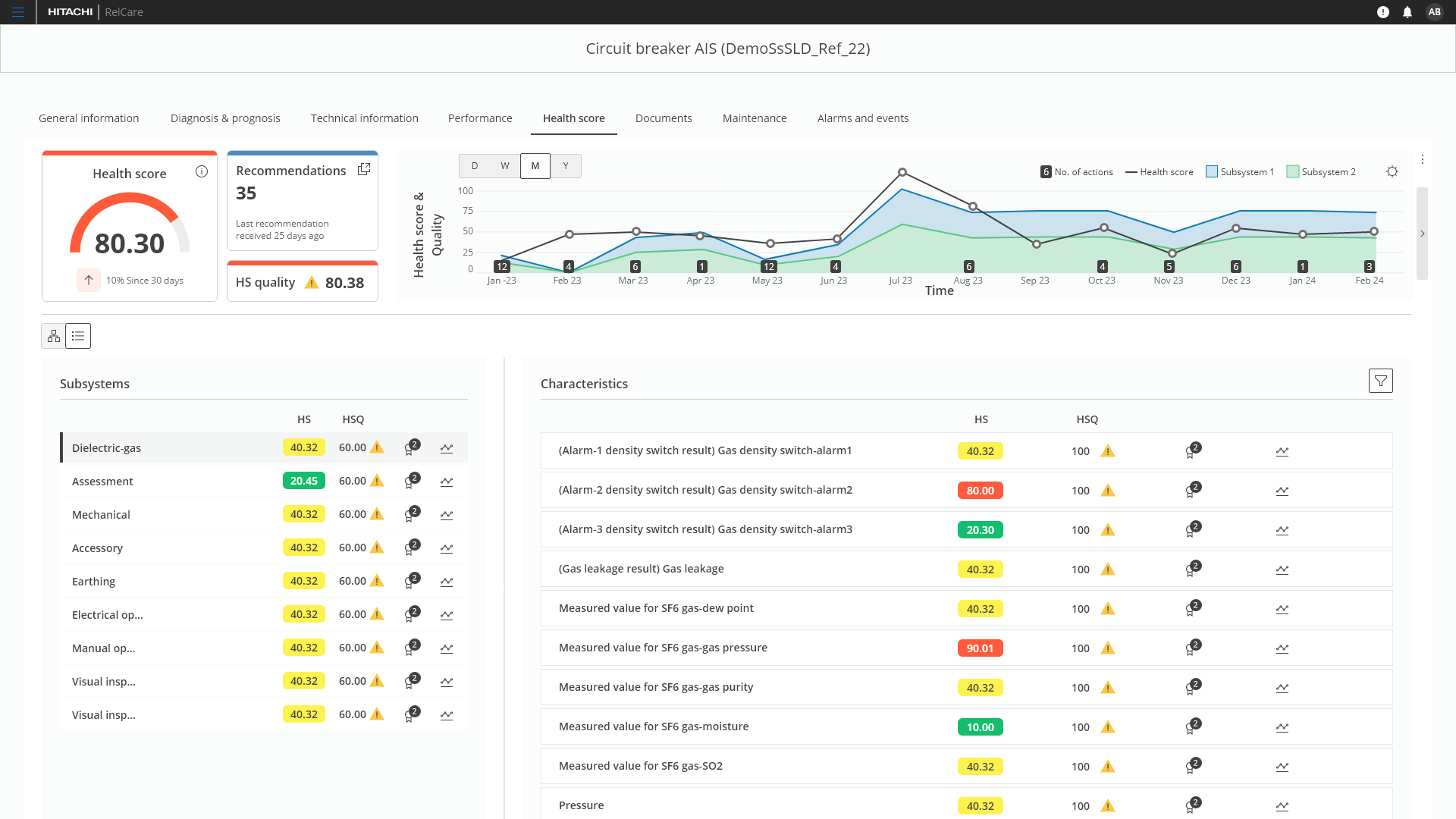
Replaced flat cards with a split layout: subsystem list on the left with color-coded health scores, characteristic details on the right. Engineers scan six subsystems in seconds and drill deeper only when needed.

Health Score — Subsystem View

The redesigned Health Score page showing subsystem list on the left with color-coded health scores, and characteristic details on the right with individual scores, quality indicators, and trend sparklines.

Health Score — Tree View

Hierarchical tree view showing the full breakdown from asset to subsystem to individual characteristics, with expandable nodes and inline status indicators.

SLD Editor: Risk overlay

Added a risk matrix overlay to the substation schematic — plotting each asset's condition against its importance with a color scale. Maintenance managers can now see where risk concentrates spatially, directly on the diagram they already understand.

SLD Editor — Risk Overlay

The SLD editor showing the substation schematic with a risk matrix overlay, color-coding assets by condition and importance for spatial risk assessment.

Asset detail: Progressive disclosure at scale

Asset detail pages manage 50+ characteristics across General, Assessment, Auxiliary, Rating, and Data Sheet categories. The old interface showed everything at once.

The redesign introduced collapsible accordion sections — engineers land on five clean headers and expand only what they need. Each section adapts its layout to the content type: key-value grids for General, deviation flags for Assessment, dropdown selects for Data Sheet.

Asset Detail — Collapsed Overview

Clean starting state with five collapsible sections. Engineers see the full structure at a glance and expand only what they need — reducing cognitive load on pages with 50+ data fields.

Asset Detail — General Section Expanded

The General section expanded showing a two-column key-value layout with an image gallery sidebar. Other sections remain collapsed, keeping the page focused.

Maintenance execution: Designing the last mile

The module where diagnosis becomes action. The design challenge here was form complexity — a single task validation screen needs to accommodate safety protocols, equipment lists, test results, image uploads, team assignment, and scheduling.

The approach: sectioned tabs for task content on the left, persistent effort/team/schedule panel on the right. Two dedicated micro-interactions:

  • Conclusion section — structured place for final assessment and sign-off, replacing scattered comments across fields.
  • Image title editing — inline-editable titles so engineers name uploads meaningfully instead of "IMG_2024_0347.jpg".
Maintenance — Conclusion Section

Task validation screen with the Conclusion section expanded. Checklist items surface deviations with clear status badges, while effort tracking and team details stay persistent on the right.

Maintenance — Editing Deviations

Inline editing of conclusion items. Validators record findings directly alongside deviation flags — no separate forms or modal windows.

Maintenance — Image Upload (Before)

Uploaded images receive system-generated filenames like 'Defaultname.png' — meaningless to the team reviewing them months later.

Maintenance — Image Title Editing (After)

Engineers can now rename images inline at the point of upload, replacing generic filenames with meaningful descriptions.

Design system contributions

Several patterns developed for RelCare — tree views, health score badges, sparkline trends, risk overlays — were contributed back to the NEXT design system as reusable components.

Design system component sheet showing tree view node, health score badge, sparkline trend, and risk overlay legend — patterns contributed back to the NEXT design system
This is the first time the interface shows me what I actually need to see first. I can assess six subsystems in ten seconds. Before, I had to scroll through everything and piece it together in my head.
Domain Expert, Validation Session
The task validation screens finally match how the work actually happens in the field. The engineer can focus on the test, and everything else — the team, the schedule, the outage window — stays right there without scrolling back to check.
Product Manager, Maintenance Module
06 · Transformation

Before and after

Side-by-side comparison: the old flat card layout with horizontal scrolling and N/A noise on the left, versus the new hierarchical view with subsystem drill-down, color-coded scores, and trend sparklines on the right
Before: Flat card layout
  • All 50+ characteristics at the same visual level
  • Horizontal scrolling required to see all subsystems
  • No subsystem-level health summary
  • N/A values creating visual noise everywhere
  • No risk context on the engineering schematic
After: Hierarchical drill-down
  • Six subsystem scores visible at a glance
  • Drill-down from subsystem to characteristics
  • Color-coded health scores for instant scanning
  • Trend sparklines showing health trajectory
  • Risk overlay directly on the SLD schematic
07 · Results

Validation and impact

Validated through domain expert feedback sessions and remote walkthroughs with the engineers we'd interviewed during discovery.

[PLACEHOLDER]%
Assessment time reduction
Estimated reduction in time to identify problem subsystems, based on domain expert walkthroughs
4
Modules redesigned
Health Score, SLD Editor, Maintenance Management, and Health Reporting
[PLACEHOLDER]
Components contributed
Reusable patterns contributed back to the NEXT design system
"The subsystem view is exactly how we think about assets. This is the first interface that doesn't force us to reorganize the data mentally."
"Having the risk overlay on the SLD changes how we run review meetings. We can point at the diagram and everyone sees the same picture."
"The old interface was technically complete — it showed all the data. But showing all the data and showing the right data first are very different things."
"I've used the previous version for three years. This is the first time I felt like the tool was built by someone who understood how we actually work."
What impressed me most wasn't the interface itself — it was how the design team synthesized insights from remote interviews and domain expertise into something that felt like it was built by someone who'd spent years in the field. That research approach should be a template for distributed teams.
Product Manager, RelCare

Key improvements

  • Subsystem-level scanning. Engineers can now assess the health of all subsystems in a single view without scrolling, reducing the cognitive load of identifying problem areas.
  • Hierarchical drill-down. The subsystem-to-characteristic structure replaced the flat card layout, matching how engineers mentally organize asset data.
  • Risk visibility on the SLD. The risk matrix overlay on the substation schematic gave maintenance managers a spatial view of risk they didn't have before.
  • Progressive disclosure across asset details. Collapsible sections with search and settings replaced the all-at-once data dump, letting engineers control exactly how much detail they see.
  • End-to-end maintenance workflow. The task validation screens closed the loop from diagnosis to execution, with structured conclusions, deviation tracking, and meaningful image documentation.
  • N/A noise eliminated. The tree view structure naturally filters irrelevant characteristics, showing only what matters for each subsystem.
  • Design system alignment. All new screens were built within the evolving NEXT design system, with several patterns contributed back to the shared library.
08 · Reflection

What I learned

Remote research works when you close the distance. Live camera walkthroughs brought us close to contextual inquiry despite geographic distance. Combining field observations with interviews and domain expert sessions gave us both behavioral richness and expert depth.

The turning point was a sketch, not a metric. A 30-second whiteboard drawing by a domain expert became the information architecture for the entire platform. Breakthroughs come from giving experts the right moment to externalize their mental models.

End-to-end ownership matters. Designing all four modules meant the same mental model — asset → subsystem → characteristic — flows consistently from Health Score through to Maintenance execution. Without that ownership, those connections get left to chance.

A parallel design system is an opportunity. The NEXT design system was being built alongside RelCare. I used the product's complex needs to push the system forward — contributing reusable patterns back to the shared library.