Unifying Flight Test Document Authoring
Replacing a fragmented multi-tool process with a single platform for authoring, approving, and publishing flight test requirements
Challenge
Before a flight is cleared for takeoff, engineers must compile test requirements into a Work Request Document (WRD), a formal document that authorizes test execution and captures results. This process was spread across Excel, Word, and third-party tools with no single source of truth, leading to duplicated effort, version confusion, and delayed approvals.
Solution
We designed a unified web application that replaced the fragmented toolset with a single platform for WRD authoring, multi-stakeholder approval, and publication. Engineers could clone existing documents, track approval status in real time, and compare test conditions without leaving the application.
My Role
An onsite UX researcher led a two-day contextual research session with a small pool of flight engineers. I owned wireframing and prototyping from start to finish, turning research findings into task flows, wireframes, and clickable prototypes that we tested with engineers.
Research & Discovery
From the research, we built personas to make sure our design decisions stayed connected to what users actually needed.
Our user
The primary user is an aircraft flight engineer responsible for compiling test requirements into Work Request Documents (WRDs). They coordinate across multiple teams, manage approval chains, and need to ensure every document meets strict compliance standards before a flight test can proceed.
The surprise wasn't that engineers found the document process complex. They expected that. What frustrated them was that their tools forced them to redo work that already existed. They'd find a previous WRD that was 80% similar, then spend hours copying and reformatting it because there was no structured way to clone and modify.
Context & Constraints
Aerospace imposed constraints you don't usually run into on product teams. These four shaped how we designed.
What we learned
Two findings from the research drove the rest of the project.
WRD reuse over fresh creation
Most users told us they rarely start a WRD from scratch. They find a similar existing document, copy it, and modify it. Any solution that forced a blank-slate workflow would fight their established practice and add time to the process.
Approval tracking was the hidden bottleneck
Engineers spent significant time chasing approvals via email, losing track of where a WRD was in the review chain. The lack of status visibility was as painful as the authoring inefficiency itself.
I spend more time copying and reformatting old WRDs in Excel than I do on the actual test requirements. If I could just clone an existing document and update it, that would save me hours every week.
Our Design Target
- ✗ WRDs authored in Excel and Word separately
- ✗ Approval tracked via email chains and manual follow-ups
- ✗ No way to clone or reuse previous WRDs efficiently
- ✗ Test condition analysis done with separate comparison tools
- ✓ Single platform for WRD authoring, review, and approval
- ✓ Structured approval workflow with status visibility
- ✓ Clone and modify existing WRDs with one click
- ✓ Built-in similarity analysis for test condition comparison
Mapping workflows
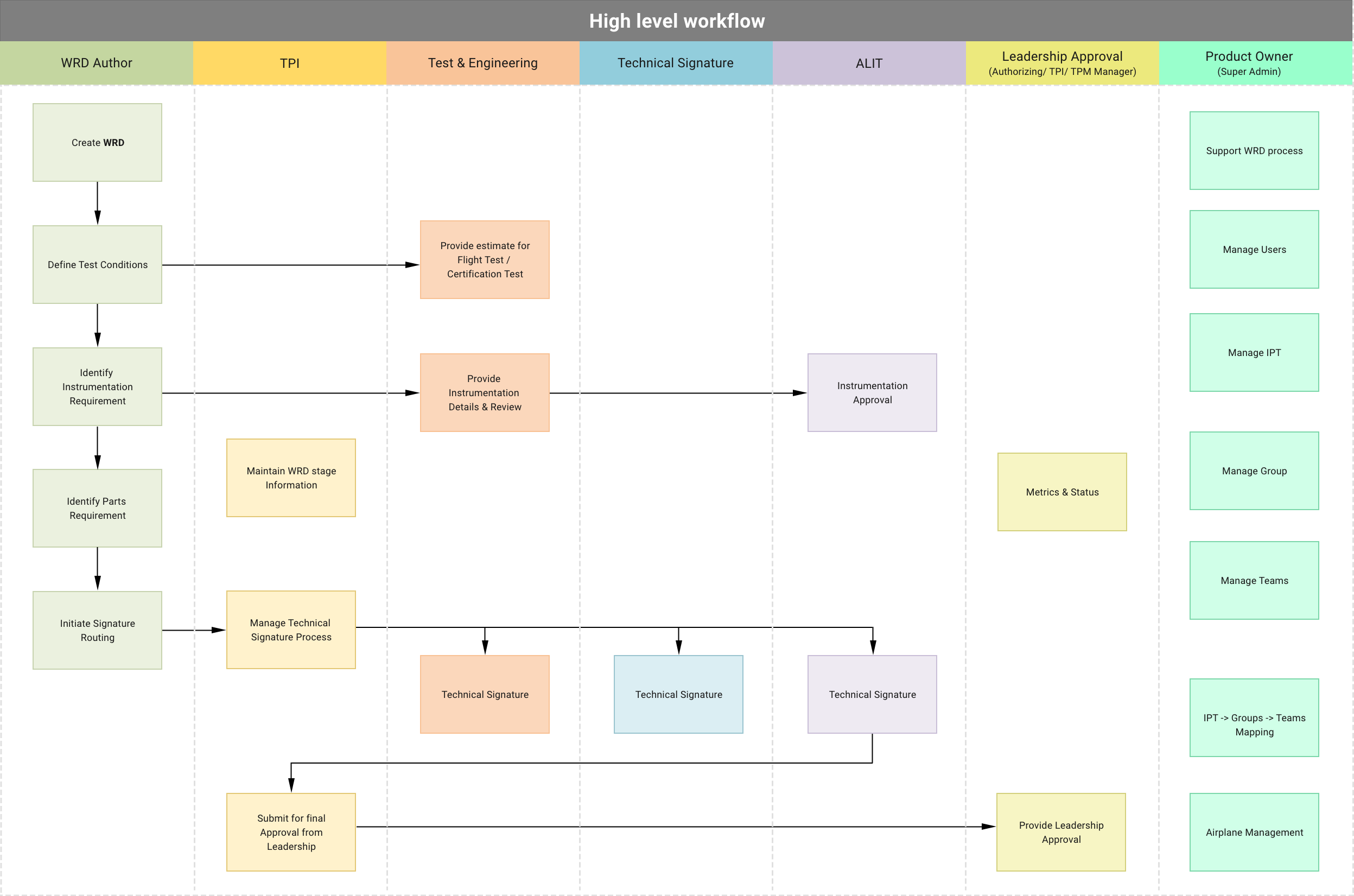
One of the most useful outputs from research was a map of the full WRD lifecycle. We documented every role, every activity, and the complete flow from authoring through approval to publication. This got the whole team looking at the same picture before we started designing.
The workflow showed us that the approval chain wasn't linear. Different WRD sections needed different approvers, and those approvers only needed to see their sections. That led us to build section-level status tracking instead of a single approval status for the whole document.
Designing key screens
The persona and workflow diagram pointed to two areas worth focusing on: WRD authoring (where engineers spend the most time) and approval management (where the most friction was). We put our design effort there.
We started with rough sketches and Axure drafts, walked engineers through them to check direction, then moved into detailed prototypes. Their feedback shaped the final designs.
Key design decisions
- Clone-first authoring — The default entry point lets engineers search and clone an existing WRD rather than starting blank, matching how they already work.
- Inline approval management — Approvers are added and sequenced within the WRD view, replacing the disconnected email chain.
- Status at every level — Each WRD section shows its approval state, so engineers can see immediately what's blocking publication.
WRD Authoring Tool
The core interface puts what was previously spread across Excel, Word, and other tools into one view. The entry point is search and clone: find an existing WRD, duplicate it, modify it. That matches how engineers already worked and cuts the reformatting time out.
Approval Workflow
We weighed two approaches: email notifications (familiar but invisible) versus inline approval management (new but transparent). We went with inline. Approvers are added, sequenced, and tracked right inside the WRD view. Engineers see who needs to sign, in what order, and where things are stuck.
Similarity Analysis
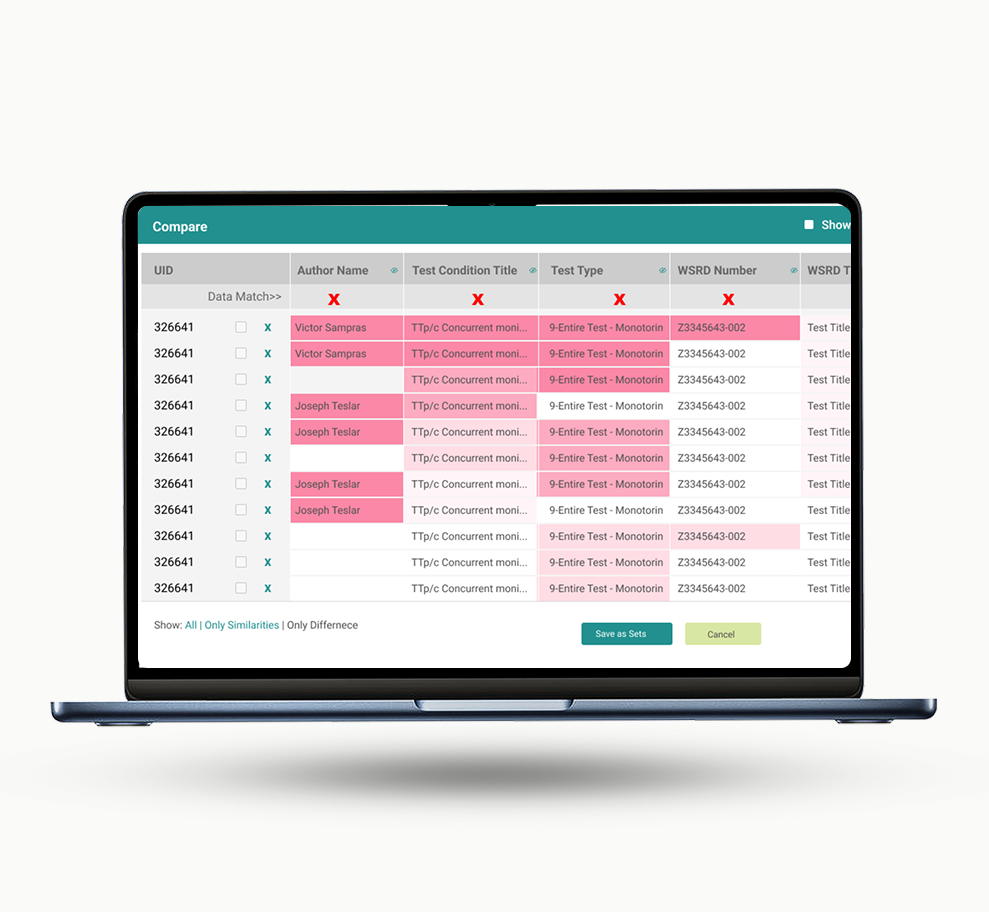
Engineers used separate comparison tools to decide which test conditions to include in a WRD. That meant switching apps, losing their place, and sometimes redoing analysis. We built this into the application so they could compare conditions by attributes, values, and associations without leaving their authoring flow.
Similarity Analysis: design deep dive
This was the densest screen in the application. The problem: how do you show complex comparison data in a way that supports fast decisions without stripping out the detail engineers need?
Drill-down analysis
When engineers compare test conditions, they need to check attribute-level similarities before deciding. The drill-down view shows only the parameters that differ, so the screen isn't cluttered with matching values. Full data is still one click away.
Grouped results
Instead of a flat list of comparison results, we grouped them by status: unchanged, modified, and new. Unchanged conditions can be reused as-is. Modified ones need review. New ones need full evaluation.
The summary screen with match scores across all compared conditions. Engineers review the scores here, pick the conditions to include, and add them to the WRD without switching tools.
Results & Impact
Pre- and post-implementation surveys showed improvements in both speed and accuracy of WRD creation.
Reduction in WRD creation time
Reduction in WRD rejections
The clone feature alone saved us hours. I used to dread starting a new WRD because I knew I'd spend the first hour just finding and reformatting an old one. Now it's two clicks and I'm editing.
Being able to see exactly where my WRD is in the approval chain, who's signed, who hasn't, means I'm not sending follow-up emails three times a day anymore.
Reflection & Learnings
Aerospace taught me something about simplification: it doesn't mean hiding complexity. It means showing the right information at the right moment so the people who know the domain can focus on judgment, not on fighting their tools.
We had a small group of engineers for two days. That's it. But the findings were specific enough to drive every major design decision. Clone-first authoring, inline approvals, both came straight from those conversations.
If I could redo parts of this project, I'd push for a longer research window. Diary studies could catch workflow patterns that don't show up in a two-day visit. I'd also run a second usability round after launch, not just on the prototypes. And the Similarity Analysis screen tried to show too much at once. Progressive disclosure (start with a summary, let people drill in) would have helped less experienced engineers get oriented.